“How I Use Claude Cowork (Claude in Chrome) to Find Broken Google Listings—and Get Paid $300–$500 to Fix Them!
Watch this video for a full run through...10 minutes only!
“I found my first business to contact the same day I watched the training. Two emails later, I had a paid audit. This is about as straightforward as it gets.”
From the desk of 15-year veteran internet marketer, Lee Cole!
How I've Been Using Claude Cowork (Claude in Chrome) with Clients' Google Listings...
Lately, I’ve been using Claude Cowork (Claude in Chrome) to find local businesses with broken or neglected Google Business Profiles.
Not in theory.
Not as a “case study.”
With real businesses and real clients.
Here’s how I do this:
I open Google.
Search for a business type in a city.
Click a listing.
Then I open Claude Cowork (Claude in Chrome). (It’s a Chrome browser extension.)
In seconds, Cowork tells me whether that business needs help or not. (Using my prompts, which I’ve perfected.)
If the listing looks solid, I skip it and move on.
If the listing is missing obvious things—photos, services, descriptions, links, posts—I know immediately.
Those are the only businesses I contact, the ones who need easy help.
I send a short email or Facebook message pointing out a few specific problems with their Google listing.
Nothing fancy. Just facts.
I do this about 10 times a day.
That’s enough to keep me as busy as I want.
When a business owner replies and asks for help, I already know what’s wrong with their listing…because Claude Cowork (Claude in Chrome) already showed me.
No guessing.
No audits from scratch.
No wasted time.
What Claude Cowork (Claude in Chrome) Is (And How It Actually Works)...
Claude Cowork (Claude in Chrome) is an in-browser AI workspace that runs as a Chrome extension.
You can use Claude Cowork (Claude in Chrome) with either a Windows or Mac machine, because you're NOT installing Cowork on your computer. You're installing it as a Chrome browser extension.
Cowork (Claude in Chrome) lets Claude AI see and interact with the exact web page you’re looking at—in real time. (Just like a human would, only faster, and it's much smarter!)
Not a screenshot.
Not copied text.
Not a URL pasted into a chat box.
A live page.
When I’m on a client’s Google Business Profile, Claude Cowork (Claude in Chrome) is on that same page with me.
I give it instructions using prompts I’ve perfected just for finding GBP listings that need help and fixing them.
Cowork follows them immediately.
It reads what’s visible on the listing:
• Business name, address, phone
• Hours and service areas
• Photos and videos
• Descriptions and services
• Reviews and owner responses
• Posts, links, and missing sections
Then it reports back exactly what it sees.
No guesswork.
No assumptions.
No “based on what you told me…”
Claude Cowork (Claude in Chrome) looks at the page itself and works through it step by step—just like a human would, only faster and more consistent, and with automatic access to all the recent SEO changes.
That’s the foundation of everything else you’re about to see.
Why Claude Cowork (Claude in Chrome) Is Different from Regular Chat-Based AIs...
Most AI tools are chat-based. You ask them something, they give you the answer.
If you want them to “see” something, you have to upload it.
You describe something.
You paste a link.
You explain what you’re looking at.
Then the AI guesses.
Claude Cowork (Claude in Chrome) works differently.
With Cowork, Claude AI is inside your browser—on the same page you’re on.
You open a Google Business Profile or a website.
You launch Cowork.
You give it instructions.
Claude doesn’t imagine what’s there.
It actually reads the page directly.
It scrolls.
It clicks.
It checks sections.
It looks for what’s missing.
In other words, it behaves like a careful assistant sitting next to you, going through the page step by step.
That’s why I can use Cowork to evaluate live Google listings and websites in seconds—without copying links, screenshots, or explanations into a chat window.
No translation layer.
No interpretation errors.
Claude Cowork sees what you see—and works from there.
How I Use Claude Cowork (Claude in Chrome) to Find Businesses That Need Help — Fast...
Once you understand how Claude Cowork (Claude in Chrome) works, the workflow is simple.
I don’t research.
I don’t dig.
I don’t analyze competitors.
I open Google and search for a business type in a city.
Roofers.
Electricians.
HVAC companies.
Plumbers.
Lawyers.
Dentists.
I click a listing.
Then I open Claude Cowork (Claude in Chrome) and run the prompt I created.
In seconds, Cowork tells me one of two things:
• Skip this one — the listing is solid
• This business needs help — and here’s what’s missing
Using my prompt, Cowork will check all of the following and more...
Photos.
Services.
Descriptions.
Links.
Posts.
Booking options.
If Cowork says “skip,” I move on immediately.
If it flags problems, I already have enough information to contact the business owner.
I send a short email or Facebook message pointing out a few specific issues with their Google listing.
No pitch.
No hype.
Just facts pulled directly from their own profile.
How I Use Claude Cowork (Claude in Chrome) to Audit Listings and Generate Fix Instructions...
Once a business owner replies and asks for help, I don’t start from scratch.
I open their Google Business Profile again.
I launch Claude Cowork (Claude in Chrome).
I run a second prompt.
Claude Cowork (Claude in Chrome) scans the entire listing in real time and produces a full audit.
Not generic advice.
Not SEO theory.
A clear list of what’s wrong with that specific listing.
Missing sections.
Incomplete details.
Inconsistent information.
Unused features.
Neglected updates.
Then I run one more prompt.
Claude Cowork (Claude in Chrome) turns that audit into step-by-step fix instructions.
Exactly what needs to be done.
In the correct order.
With no guesswork.
I can follow the instructions myself…
or hand them off to a Fiverr contractor and let them do the work.
Either way, I’m not figuring anything out manually.
Claude Cowork (Claude in Chrome) does the thinking.
I just deliver the results.
What I Charge — And What It Costs Me to Deliver...
Here’s how the math works.
When a business owner wants a full Google Business Profile audit, I charge $100.
They pay before I do any work.
Claude Cowork (Claude in Chrome) generates the audit in minutes.
If they want the issues fixed, I charge $395 for the cleanup and optimization.
That covers:
Updating the profile correctly
Filling in missing sections
Cleaning up obvious problems
Making the listing presentable and professional
Most of the time, I don’t even do the work myself.
I outsource the fixes to Fiverr.
Typical delivery cost: under $50.
No employees.
No agency overhead.
No complicated fulfillment.
Claude Cowork (Claude in Chrome) tells me what to fix and how to fix it.
I hand off the instructions.
The work gets done.
I keep the spread.
This is a simple, 3-step business...
Step 1: Find Businesses That Need Help
Open Google, search for a business type in a city, click a listing, and open Claude Cowork (Claude in Chrome).
In seconds, Cowork tells you whether the listing needs help or should be skipped.
Step 2: Contact and Sell the Audit
For listings that need help, send a short email or message pointing out a few specific issues.
When the owner replies, sell a $100 Google Business Profile audit.
Step 3: Deliver the Audit and Get Paid to Fix It
Claude Cowork (Claude in Chrome) generates the audit in minutes.
If the owner wants the problems fixed, charge $395 and either do the work yourself or hand the instructions to Fiverr.
Ready to Learn How to Use This Powerful Platform In Your Own Business?
If this sounds like something you could use in your own business — or even as a simple side income — then you’re ready for the next step.
I put this entire process into a short, practical mini-course anyone can follow.
It’s called Claude Cowork Cash.
No fluff.
No theory.
Just the exact workflow I’m using right now.
Let me show you what I’ve put together.
Introducing Claude Cowork Cash!

If you like the idea of getting paid $300–$500 per client to audit and fix broken Google Business Profiles — using a simple Claude Cowork (Claude in Chrome) AI workflow you can learn in an afternoon — then you’re going to like what I’ve put together for you.
I’ve created a complete, step-by-step system that shows you:
• How to use Claude Cowork (Claude in Chrome) to quickly find local businesses with obvious, easily fixable Google profile problems
• How to decide in seconds whether a business is worth contacting (or skipping)
• How to send a simple outreach email that business owners and managers can’t help but respond to
• How to deliver a professional Google Business Profile audit—Claude Cowork (Claude in Chrome) does all the work
• How to get paid before you do any work
• How to use Claude Cowork (Claude in Chrome) to fix a client’s GBP issues yourself or hand them off cleanly to Fiverr—no previous experience necessary
• How to repeat the process a few times a day without turning it into a grind
Along with the full step-by-step walkthrough video, you’re also getting a complete set of done-for-you tools, prompts, and templates that make this system dead simple to run:
• Claude Cowork Prompt #1 (Triage Prompt) — instantly tells you whether a Google Business Profile needs help or should be skipped.
• Claude Cowork Prompt #2 (Full Audit Prompt) — generates a professional, client-ready GBP audit in minutes.
• Claude Cowork Prompt #3 (Fix Instructions Prompt) — turns the audit into step-by-step instructions you can follow yourself or hand to Fiverr.
• Prospecting Email Template — copy, paste, send. Points out real issues without sounding salesy.
• Cold Message Script (Email / Facebook) — for businesses you can’t reach by email.
• Leads Tracking Spreadsheet — track who you contacted, when you emailed, who replied, and who closed.
• Audit Delivery + Upsell Email Template — deliver the audit professionally and transition into paid fixes.
• Best Local Business Types List — proven niches where broken Google listings are common and easy to monetize.
• Cowork Usage Guide — shows you exactly how to run Claude Cowork (Claude in Chrome) inside your browser, step by step.
• Walkthrough Video — watch me do the entire process live, from Google search to paid audit.
Everything is beginner-friendly.
Everything is low-tech.
Everything is designed to get you paid quickly.
No SEO theory.
No software setup.
No APIs.
No coding.
No dashboards.
You open Google.
You open Claude Cowork (Claude in Chrome).
You follow the prompts.
Claude does the thinking.
You show the business owner what’s broken.
You get paid to fix it.
But Before You Hit the Buy Button…
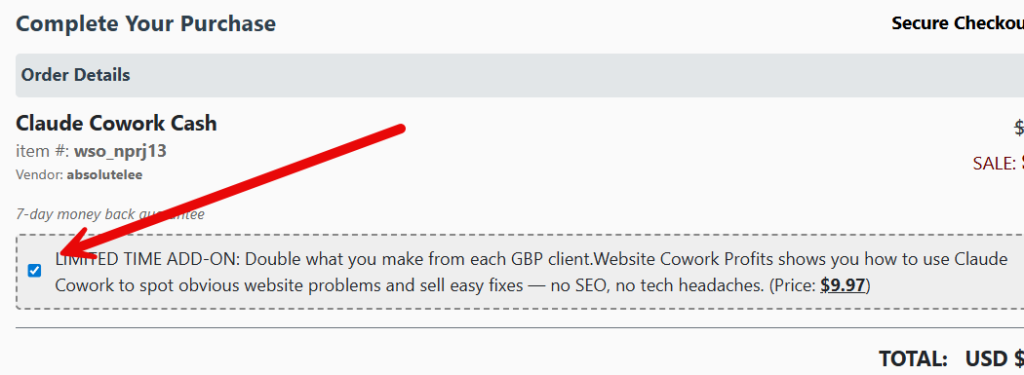
Let me tell you about the add-on — a special one-time upgrade that can help you double the money you make off of each client!

Do you want an easy way to make more money from the exact same client…
without ads…without SEO rabbit holes…without becoming a “web guy”?
Because after I finish the Google Business Profile work, I often do one simple add-on:
A practical website audit that finds obvious, fixable problems that hurt clarity and conversions.
Not technical SEO.
Not keyword nonsense.
Just low-hanging fruit.
I call this upgrade Website Cowork Profits.
Here’s how it works:
• I run Website Prompt 1 inside Cowork and it gives me a clean list of visible issues worth fixing (written in plain English for the business owner).
• I email the client and book a quick 20-minute Zoom call to walk them through the list.
• If they want it fixed, I either do it (or outsource it)…
or I generate a scoped, client-safe execution plan using Website Prompt 2.
What you get in the Website add-on:
• Website Prompt 1 (Owner-Friendly Website Audit) — finds 4–8 high-impact issues (clarity, trust, conversions, usability).
• Website Prompt 2 (Fix Plan / Execution Instructions) — turns the audit into a clean checklist + content drafts + outsourcing tasks.
• Website Outreach Email Template — the simple “thanks again…noticed a few things…” email to book the Zoom call.
• Simple Selling Flow — when to send the audit, when to call, and how to offer either “instructions only” or “full fix.”
This upgrade is optional.
But if you want the easiest way to turn one GBP client into extra revenue…
this is it.
Same client.
Same conversation.
Same trust.
New invoice.
Double the money!
Check the box at checkout, and the ADD-ON will be added to your purchase automatically!
7-day, no questions asked guarantee!
Frequently Asked Questions
I thought Claude Cowork only worked on Macs?
That's if you want to install it on your computer. That's NOT what this is. We're talking about installing the Claude Cowork (Claude in Chrome) extension in your Chrome browser. You can do that from any type of computer.
Do I need Claude Cowork (Claude in Chrome) to use this system?
Yes. Claude Cowork Cash is built specifically around the Claude Cowork (Claude in Chrome) browser extension. It’s what allows Claude to see and interact with live Google Business Profiles and websites in real time.
Do I need the paid version of Claude?
Yes. You’ll need Claude Pro, which is currently about $20 per month. That’s the only tool cost required to run the system.
Is Claude Cowork (Claude in Chrome) hard to set up or use?
No. It runs as a browser-based extension. You install it, open a web page, click Cowork, and paste in the prompts I give you. I walk through the entire process step by step.
Do I need SEO experience or technical skills?
No. This isn’t SEO. You’re identifying obvious, visible problems on Google listings and websites and showing them to the business owner. Claude Cowork (Claude in Chrome) handles the analysis.
Do I need to talk on the phone or do sales calls?
Not usually. Most outreach happens through short emails or Facebook messages. If a client wants help, they reach out to you. Calls are optional and typically short.
Do I need to log into a client’s Google account?
Only if you’re doing the fix work yourself. If you outsource the fixes (which I usually do), you can have the business owner grant access or let your contractor handle it.
Can I outsource the work?
Yes. In fact, that’s how I normally do it. The system generates clear fix instructions you can hand to Fiverr contractors. Typical delivery cost is under $50.
How much can I realistically charge?
In the training, I show how I sell audits for $100 and fixes for $395. You can charge more or less depending on the client and the work involved.
How much time does this take per day?
About 30 minutes to find and contact 10–15 businesses. Delivery time is minimal because Claude Cowork (Claude in Chrome) does the heavy lifting.
Is this an agency or a full-time business?
It can be, but it doesn’t have to be. Many people will use this as a side income or quick-cash service. Scale it only if you want to.
Is this officially affiliated with Anthropic or Claude?
No. This is an independent training showing how to use Claude Cowork (Claude in Chrome) as a tool in a practical, real-world business workflow.
Copyright © LEE COLE 2022-Present. All Rights Reserved.